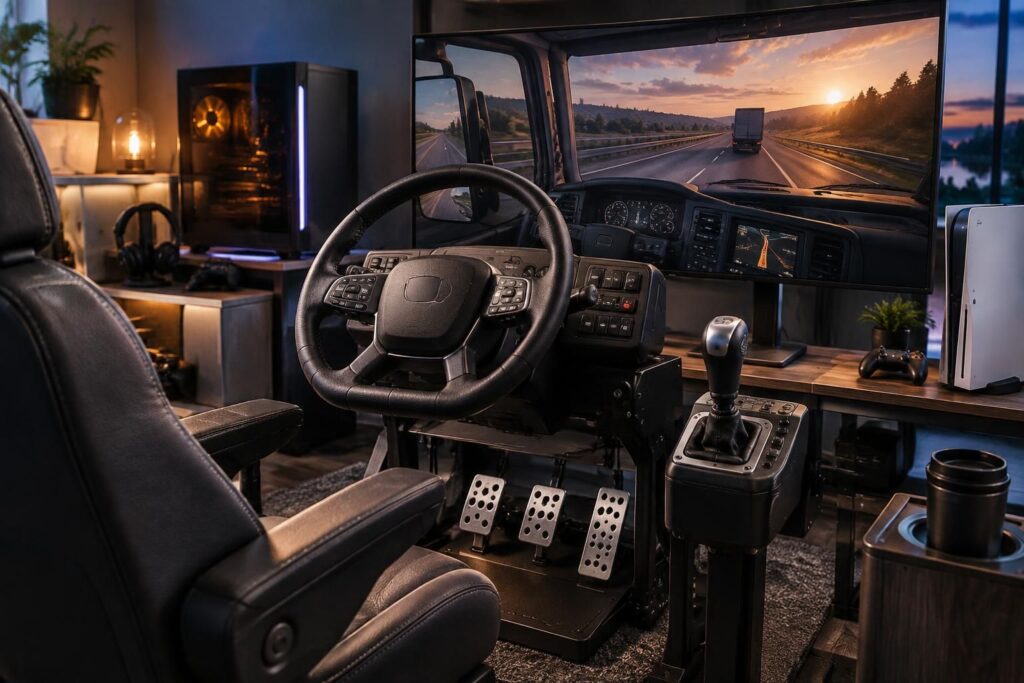
The cabin of a heavy truck is better revealed when every turn can be felt in the hands. For truck driving simulation on PC or PS5, a steering wheel offers more precision than a controller, but the choice depends as much on the platform as on the sensations sought: wide rotation, force feedback, pedals, or gear lever. A model compatible with a computer doesn’t necessarily work on console, and certain versions of the same product differ depending on their connectivity.
To illustrate the journey, let’s take Leo, who wants to travel long roads on PC before also playing in the living room on PS5. An entry-level PC steering wheel can be enough to start with, while a force feedback wheel makes corrections and surface changes more noticeable. On console, compatibility must be verified before purchase, without relying solely on the name of the range. The best gaming wheel is therefore the one that matches the platform, the game, and the available space, with accessories that can be added over time.
In brief
- For the PS5: favor a model explicitly compatible, such as the Logitech G29 or the Thrustmaster T300 RS GT.
- For the PC: the PXN V99 and V900 Gen2 offer rotation up to 900°, with compatibilities that vary depending on the platforms.
- To check: force feedback, gaming pedal set, truck gear lever, and desk or cockpit mounting.
- To enrich the cabin: the Logitech G Saitek side panel adds assignable buttons, but it is intended for PC and Mac.
Which truck simulation wheel to choose according to your platform?
The first step is to start from the console or computer used, before comparing options. A wheel announced for PC and PS4 is not automatically a PS5 compatible wheel: compatibility must be specified for the concerned console, ideally for the exact model sold.
For Leo, who plays on both systems, an officially supported PS5 model remains the safest choice. On computer, the selection is wider and software settings can offer more flexibility. The platform decides the playground; the sensations come next.
Models suitable for PS5 and PC
The Logitech G29 and the Thrustmaster T300 RS GT are common choices to play on PS5 and PC. They enable equipping a force feedback wheel, a feature that reproduces the resistances felt in the game, for example when the truck takes a turn or drives over an uneven surface.
The Thrustmaster T248 offered in the commercial selection is presented in its Xbox Series X|S, Xbox One, and PC version: this variant should therefore not be chosen for a PS5. Range names can cover different editions, so the product sheet and compatibility logos must be checked before any order.
PC options with a contained budget
The PXN V99 and PXN V900 Gen2 feature adjustable rotation up to 900° depending on the versions, with pedals and wheel controls. The V99 notably announces a 3.2 Nm force feedback and an H-shaped lever in the offered package; indicated compatibilities include PC and certain consoles, but not PS5. The V900 Gen2 relies on vibration feedback: it should not be confused with a more elaborate mechanical force feedback system.
These references can interest PC players who want to discover physical controls without immediately investing in a high-end cockpit. For a console experience, their interest entirely depends on the precise compatibility of the purchased version.
| Model or accessory | Indicated platforms | To remember for the truck |
|---|---|---|
| Logitech G29 | PS5 and PC | Option to consider for a force feedback wheel on PlayStation consoles. |
| Thrustmaster T300 RS GT | PS5 and PC | Sensation-oriented alternative, to compare depending on price and included equipment. |
| Thrustmaster T248, Xbox version | Xbox Series X|S, Xbox One, and PC | The presented version is not intended for PS5. |
| PXN V99 | PC, Xbox, and PS4 depending on the offer | Rotation up to 900° announced, H-shifter and pedals; PS5 compatibility not indicated. |
| PXN V900 Gen2 | PC and some consoles depending on the version | Vibration feedback and adjustable rotation; check the full list of supported systems. |
| Logitech G Saitek Side Panel | PC and Mac | More than 25 assignable controls to enhance a truck simulator setup on computer. |
Features and compatibilities may vary depending on editions and sellers. The table serves as a starting reference: the technical sheet of the exact model remains decisive.
Preferred sensations for truck driving simulation
A truck is not driven like a race car. Generous rotation helps reproduce the wide gestures of driving, while force feedback can make maneuvers more immersive. For a player who mostly makes long trips, the comfort and stability of the mounting matter as much as the power of the vibrations.
The gaming pedal set supplied with the wheel allows adjusting braking and acceleration with the foot. A separate truck gear lever is not essential to start: paddles or in-game configured controls may suffice, especially with an automatic gearbox. The important thing is to keep a simple grip, especially during the first sessions.
Force feedback, vibration, and angle of rotation
Force feedback acts on the resistance of the wheel and transmits sensations related to the road or vehicle movements. Vibration feedback, in contrast, makes the device vibrate without reproducing driving forces in the same way: the two technologies therefore do not provide an identical experience.
A rotation that can reach up to 900° brings the movements closer to those of a classic steering wheel, but it requires some space and stable mounting. If the desk moves with every maneuver, a simpler wheel, properly installed, will often be more pleasant than an ambitious poorly supported setup.
Gear lever, pedals, and specialized controls
To move from occasional driving to a more detailed cabin, the truck gear lever provides an additional manipulation, while a side panel can gather functions such as cruise control or lighting controls. The Logitech G Saitek Side Panel, with more than 25 assignable buttons and an integrated autopilot, is designed for PC and Mac; it complements a wheel but does not replace it.
In practice, it is better to add simulation accessories step by step. Leo can start with wheel and pedals, then decide after some trips whether the lever or extra buttons really improve his comfort.
Building a truck simulator setup without unnecessary purchases
A successful setup doesn’t need to take up an entire room. A sturdy desk, a stable chair, and a support that prevents the wheel from slipping already form a reassuring base. Before choosing a cockpit, it is useful to measure the available space and check how the wheel is attached.
Games also matter: a wheel appreciated in one title may require different settings in another. To spot driving universes that fit, you can consult this guide on truck games on PS4, or discover a heavy cargo transport simulator.
A practical setup in four steps
- Check compatibility: choose the platform, then confirm the exact model works with the PC or console.
- Install the wheel: fix it on a stable support and place the seat at a comfortable distance.
- Adjust the controls: assign accelerator, brake, indicators, and useful functions without overloading buttons.
- Test gradually: start with a short trip and adjust sensitivity, rotation, and force according to preferences.
This progression avoids adjusting too many parameters at once. A small test session often suffices to spot a poorly placed pedal or an overly sensitive rotation.
Which simulation accessories to add first?
The first complementary purchase can be a support or cockpit, especially if the desk lacks stability. Then, a gear lever can enhance immersion for players who prefer shifting manually. On PC, a control panel becomes interesting when the game functions are numerous and hard to place on the wheel.
For controller settings or game options, this guide dedicated to the best controller for ETS2 can also help compare ways to play. Curious players of other simulations can explore the possibilities of Euro Bus Simulator 2: the same comfort and control principles remain useful, even if the vehicle changes.
| Need | Accessory to consider | Why it might help |
|---|---|---|
| Unstable wheel | Support or cockpit | Keeps the equipment in place during turns and maneuvers. |
| Manual driving | Gear lever | Adds a physical gesture to gear changes, if the game allows it. |
| Many PC controls | Logitech G Saitek side panel | Groups assignable buttons useful for vehicle functions. |
| Evolutionary setup | Replacement or adjustable gaming pedal set | Allows adapting braking and acceleration to habits. |
The best purchase order is the one that responds to a real inconvenience: stabilize before adding buttons, then complete driving according to game preferences. To visualize all options, the page dedicated to the truck simulation wheel also gathers ideas around this equipment.
Choosing the right truck simulation wheel
A good choice is based on three easy-to-remember landmarks: confirmed compatibility, sensations adapted to the play style, and realistic installation in the available space. The most expensive wheel is not necessarily the most relevant for a player discovering long trips, while a vibration model may not satisfy one looking for marked force feedback.
For Leo, the decision becomes clearer by separating his uses: an explicitly PS5-compatible model for console play, or a PC wheel offering more settings and the possibility to add a side panel. In both cases, it is better to check each reference and version before finalizing the cart.
Which truck simulation wheel to choose for playing on PS5?
The Logitech G29 and the Thrustmaster T300 RS GT are models to consider for PS5 and PC. Always check the exact reference compatibility: some versions with similar names are reserved for Xbox and PC.
Does a PC wheel automatically work on PS5?
No. PC compatibility does not guarantee operation on PS5. The manufacturer’s sheet must explicitly mention the console and the concerned wheel version.
What is the difference between force feedback and vibration feedback?
Force feedback applies resistance in the wheel to reproduce certain driving sensations. Vibration feedback makes the device vibrate but does not reproduce forces in the same way.
Is a gear lever necessary for playing a truck simulator?
No, it remains optional. Paddles, buttons, or an automatic gearbox can be suitable to start; a separate lever mainly interests players wanting more immersive manual driving.
What accessories to add after buying the wheel?
A stable support is often a priority if the desk moves. The pedal set is generally included, while a lever or a control panel can be added later depending on the game and driving habits.


