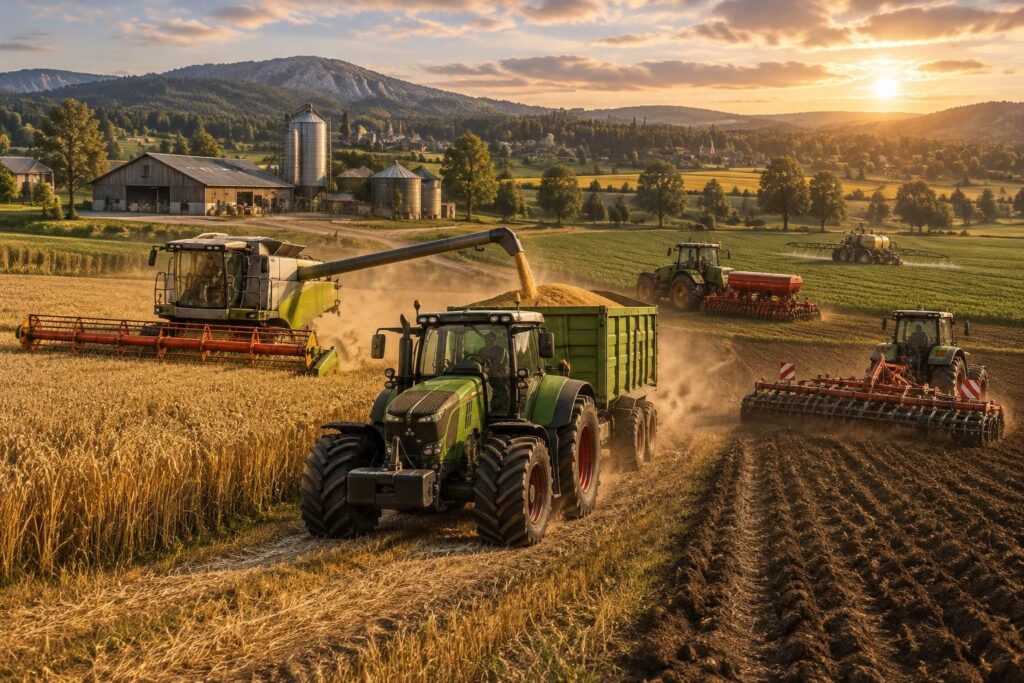
Farming Simulator 2015 already offers enough to run a farm, but mods open other paths: more specialized machines, new maps, management tools, or new ways to work the fields. On PC, this freedom allows you to adjust the game to your own pace, whether you prefer long realistic harvests or a farm easier to manage. The most interesting part is not accumulating downloads, but choosing those that make each farming day more lively.
To find your way among the Farming Simulator 2015 mods, it’s better to start from your desires: driving new vehicles, expanding your domain, or automating certain tasks. A simple guiding thread helps sort them out: the fictional farm of Les Aulnes starts with a tractor and a few plots, then develops according to the additions. The FS 2015 PC mods presented here cover these different uses, with markers to check their compatibility and install them peacefully. A well-thought-out selection transforms a familiar game into an experimental playground, without losing the pleasure of playing.
In brief: the best Farming Simulator 2015 mods on PC
- To vary the vehicles: look for mods of tractors, combine harvesters, and agricultural equipment adapted to your way of playing.
- To renew the landscapes: agricultural maps add new plots, roads, and farm layouts.
- To enrich the tasks: some management or assistance tools can complement farm activities.
- Before each installation: check that the file is intended for FS 2015, read reviews, and back up your games.
- To avoid problems: add mods one by one and test the game before installing others.
This selection favors daily useful additions: it’s better to have a few well-chosen compatible files than a folder full of mods hard to sort out.
Which Farming Simulator 2015 mods to choose based on your playing style?
The right mod mostly depends on what you like to do in the game. At the Les Aulnes farm, for example, a player who enjoys harvesting will first look for an adapted machine, while another will prefer a map with more plots to explore.
The best Farming Simulator mods are therefore not the same for everyone. To choose without scattering, start from a precise task to improve: driving, cultivating, harvesting, transporting, or developing the farm.
| Type of mod | What it brings | To check before downloading |
|---|---|---|
| Tractors and vehicles | New models or variants of machines to renew the fleet. | The FS 2015 version, features, and any required files. |
| Combine harvesters | Different harvesting equipment to adapt the operations. | Compatibility with the tools and trailers used. |
| Agricultural equipment | Additional soil work, sowing, or transport tools. | Type of hitch, function, and compatibility with the game. |
| Agricultural maps | New environments, fields, and farm layouts. | Dependencies, installation instructions, and compatibility with an existing save. |
| Management and assistance | Options to organize certain tasks or ease transportation. | The exact mod version and any possible conflicts with other additions. |
This table provides a first guide: by choosing a category before browsing catalogs, you save time and keep a coherent experience.
Agricultural tractor, combine harvester, and agricultural equipment mods
Agricultural tractor mods are often the first choice, as the tractor accompanies nearly all stages of the day. Some additions offer a different model, others a configuration or power that may better fit farm tools.
Combine harvester mods and agricultural equipment mods then expand possibilities during harvest and fieldwork. Before downloading equipment, check its category, dimensions, and prerequisites: an impressive machine is not always practical on a small farm.
Agricultural vehicle mods can also include trailers or transport vehicles. In a game like Les Aulnes, a well-chosen addition can make trips between the field and the farm smoother, provided it remains compatible with the rest of the equipment.
A short video demo allows seeing a machine in action and better judging its behavior. However, keep an eye on the indicated game version: mods made for another episode of the series are not automatically compatible with FS 2015.
Agricultural map mods: renewing FS 2015 landscapes
Agricultural map mods change the game environment and can give new impetus to an already advanced game. Depending on the map, plots, roads, or building layouts change; the daily life of the farm then no longer unfolds quite the same way.
Before choosing a new map, carefully read its presentation and player feedback. Some require additional files or are more enjoyable with equipment adapted to the size of the fields. To avoid surprises, test the map on a new save rather than on your main game.
A successful map is not just pretty: it offers a playground that makes you want to plan the next day.
Where to find FS 2015 PC mods and how to check them?
For FS 2015 mod downloads, community catalogs like KingMods, ModLand, or Nexus Mods allow browsing creations from players. Use their categories and filters, then check that the page clearly mentions Farming Simulator 2015 and the PC platform.
A clear mod page usually indicates its content, version, dependencies, and installation instructions. Recent comments can also signal an incomplete file or incompatibility; it’s better to spend a few moments reading them than discovering the problem mid-game.
Video tutorials can help locate folders and steps, especially on a first installation. Always compare the instructions with the chosen mod page, as some additions have particular directions.
Installing Farming Simulator 2015 mods on PC
For most FS 2015 mods, the file is provided in ZIP format and placed in the game’s mods folder. On Windows, the usual path is DocumentsMy GamesFarmingSimulator2015mods; unless otherwise specified, the ZIP file must remain compressed.
Proceed in small steps: this method facilitates locating a defective file and protects ongoing games. A useful little precaution is to copy the save before adding a map or an important set of mods.
- Check the page: confirm that it is indeed a mod designed for Farming Simulator 2015 on PC.
- Download from a clear page: verify the file name and any dependencies.
- Copy the ZIP: place it in the “mods” folder indicated by the game, without decompressing unless specifically instructed.
- Start the game and test: activate the mod in the game, then check its functioning before adding another.
- In case of problems: remove the last added file and restart the game to more easily identify the cause.
This gradual progression makes Farming Simulator modding easier to master and limits conflicts between additions.
Farming Simulator modding: keeping a stable game
Farming Simulator modding consists of customizing the game through community creations. Since several additions can affect the same elements, installing a large collection all at once complicates diagnosis if the game misbehaves.
A fictional farm like Les Aulnes evolves more easily with a simple rule: a new mod, a test, then the next. Also remember to keep a copy of your saves and remove files you no longer use. Thus, each addition remains a choice and not a source of disorder.
A few checks are enough to start on a good basis:
- Read the description and instructions before downloading.
- Do not mix versions intended for different Farming Simulator episodes.
- Avoid files whose origin or content is not clearly explained.
- Test map mods and additions requiring dependencies separately.
With a bit of method, modding becomes a flexible way to evolve your farm without losing track of your game.
Where to place Farming Simulator 2015 mods on PC?
The usual folder is DocumentsMy GamesFarmingSimulator2015mods. Most files remain in ZIP format, unless otherwise indicated by the mod creator.
Do mods from other episodes work with Farming Simulator 2015?
Not necessarily. Check that the download page specifically mentions FS 2015 and the PC version, as files intended for another episode may be incompatible.
How to avoid conflicts between FS 2015 mods?
Install files one by one, test the game after each addition, and back up your game before adding a map or an important mod. Also check the prerequisites indicated on the page.
Which mods to choose to start with?
A compatible tractor or agricultural tool is an easy first choice to test. Once its functioning is verified, you can add a map or a management mod according to your playing style.


